
Issuing an invoice from an Excel file or an outdated system is no longer an option for stores in Saudi Arabia; The Zakat, Tax, and Customs Authority (ZATCA) requires every business subject to value-added tax (VAT) to integrate its system with electronic invoicing, and any delay results in immediate fines. But the real problem store owners face isn’t “Should I integrate?” but rather “How do I integrate my store—especially if it’s a dedicated or multi-vendor store—without disrupting my sales or having my invoices rejected?” In this guide, we explain the process from the perspective of the store and software development—not just accounting: the steps involved, technical requirements via the API, costs, fines, the reasons why some companies fail to integrate, and how to avoid those pitfalls.
1. What is an electronic invoice (ZATCA) and why has it become mandatory?
An electronic invoice is an invoice issued and stored in a standardized electronic format that the Authority’s system can read automatically; it is not a scanned image or PDF file. Its purpose is to improve tax compliance, reduce tax evasion, and standardize the format of invoices in the Saudi market. Since the system is directly linked to the value-added tax (VAT), any business registered for VAT is automatically subject to this requirement as soon as its implementation phase begins.
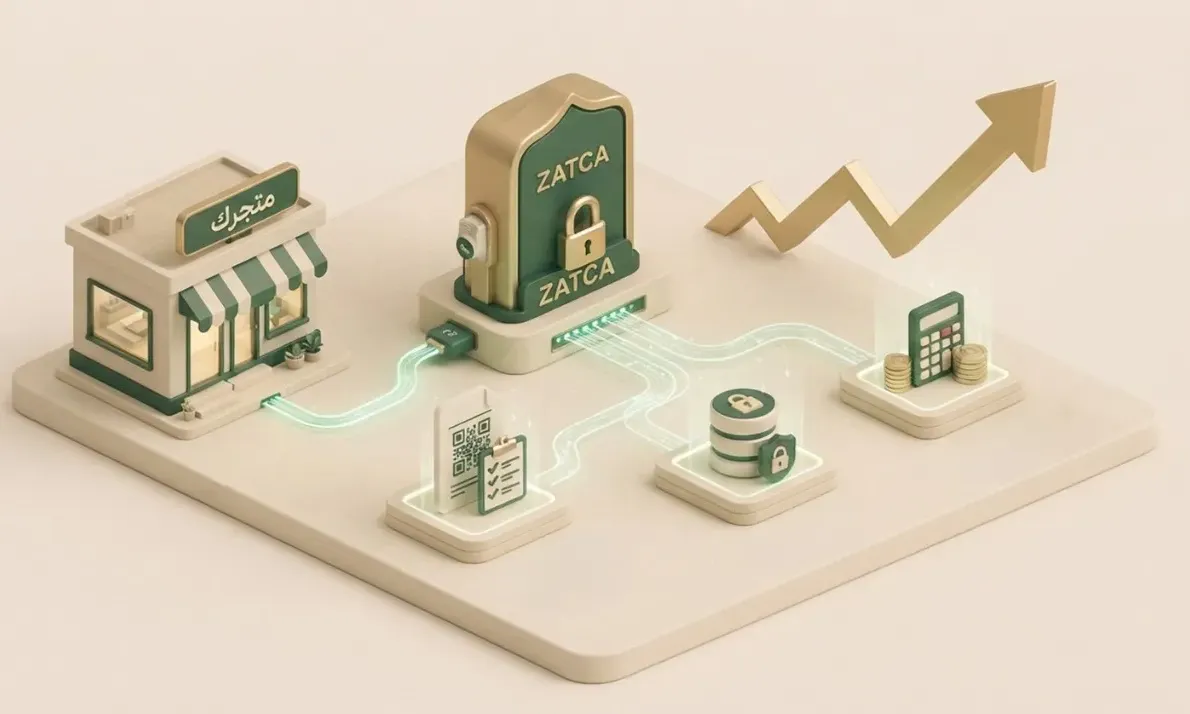
The practical implication for store owners: You can no longer issue a “manual” invoice or one generated by a non-compliant system. Your store must generate invoices in a specific format—electronically signed, bearing a QR code, and capable of being submitted to the Authority in the manner it requires. This is where the need to upgrade or modify your store to ensure compliance begins.
2. Phases 1 and 2: What’s the difference that matters to your store?
The implementation of electronic invoicing goes through two phases, and the difference between them is primarily technical and determines the amount of work required for your store:
📝
Phase 1 — Issuance and Storage
Your system issues and saves structured electronic invoices, complete with a tax number and a QR code. This is the simplest and least expensive option.
🔗
Phase 2 — Integration
Your system must actively connect to the “Fatura” platform via an API to send invoices for validation or reporting. This is where the real development takes place.
🏢
Business-to-Business (B2B) Invoices
These go through the “Clearance” process: they are approved by the authority before being delivered to the customer.
🧾
Individual Invoices (B2C)
Go through the “Reporting” process: They are sent to the Authority within a specified timeframe after issuance.
3. Technical Requirements for Connecting Your Store via the API
Upon reaching the second phase, your store will need to meet a set of technical requirements to integrate properly with the Authority’s platform:
- Issuing invoices in the approved format: Generating an XML invoice structured according to the Authority’s specifications, either tax-compliant (B2B) or simplified (B2C).
- Electronic seal and signature: The digital signature and certificate (CSID) obtained from the Authority, in addition to a QR code.
- Integration with the Authority’s APIs: Connecting the system to the APIs for submitting invoices (Clearance/Reporting) and receiving validation responses.
- Error and Outage Handling: Save invoices and responses from the Authority, and manage rejection cases or connection outages without interrupting the sales process.
- Data Validation: Validate required fields (tax ID, dates, tax amount) before submission to avoid rejection.
This integration is not just “adding a button”; it is a development that goes to the core of your store’s ordering and billing system and requires a team that understands both the technical aspects and the Authority’s requirements.
4. Ready-made store or custom store? And how does this affect the integration
The way you integrate varies drastically depending on your store type—a point often overlooked in many accounting articles:
| Type | How the Integration Works | Note |
|---|---|---|
| Store on a ready-made platform | Through an add-on/integration with a certified provider, with limited settings. | Faster but less flexible, and may not cover special cases. |
| Custom Store (Proprietary Code) | Develop a billing module integrated with the API within your system. | Full control and flexibility, but requires a skilled development team. |
| Multi-vendor store | Integration that accounts for multiple locations and tax ID numbers for each seller. | The most complex option—requires careful design of the billing logic. |
If your store is custom-built or multi-vendor, the integration is a full-fledged development project—and this is precisely where the value of a development team that understands your store’s architecture from the inside comes into play.
5. How much does it cost to integrate the store with e-invoicing?
There’s no single fixed price; the cost depends on factors that determine the scope of work:
- The nature of your store: Is it built on a well-known platform or a custom solution built from scratch (the latter requires more in-depth development)?
- Type of invoices: Only individuals (B2C) or businesses (B2B) as well? Full authentication is more complex.
- Transaction volume: High-volume stores require an infrastructure capable of handling thousands of invoices without delay.
- Solution model: A certified third-party provider with a monthly subscription, or a custom integration managed in-house; each has different upfront and operational costs.
6. Non-compliance Fines: Why Is Delay Costly?
Failure to comply with e-invoicing after your wave has arrived exposes you to fines that vary depending on the type and frequency of the violation—from failing to issue an invoice in the correct format, to failing to connect on time, to errors in mandatory data. Most importantly, these fines are recurring, not one-time, which means the cost of delaying accumulates quickly. Therefore, treating integration as a priority—not something to put off—is the most cost-effective decision.
7. Why Do Some Companies Fail to Reconcile? And How Can They Avoid It?
Setbacks are often not due to the complexity of the system, but rather to avoidable implementation errors:
🩹
Patching an outdated system
Trying to force an incompatible system to work instead of developing it properly.
🧪
Ignoring the test environment
Going live without testing integration in the ZATCA test environment, resulting in rejected invoices.
⛔
Ignoring rejection cases
Failure to address interruptions and rejections, causing the sales process to halt at the first error.
⏳
Rushing implementation
Leaving the task until the last minute before the wave deadline.
Solution: Start early with a development team that understands the requirements, thoroughly tests integration, and builds the system to handle edge cases—not just the ideal scenario.
8. The Role of Nasq 4 in Developing a ZATCA-Compliant Store
At Nasq 4, we don’t treat e-invoice integration as a superficial add-on, but as an integral part of your store’s architecture. Whether you have a store we’re developing for you from scratch or an existing system that needs to integrate with the authority, we build a solution that issues invoices in the approved format, integrates securely with APIs, and handles rejections and outages without interrupting your sales.
And if your store is multi-vendor or a large-scale business, our expertise in designing multi-vendor stores and developing e-commerce platforms in Saudi Arabia ensures that integration with ZATCA is a seamless part of a comprehensive system—not an additional burden.
Review Your Current Store
We assess your store type, invoicing, and transaction volume to select the most suitable integration path.
Developing the Billing Module
We build the invoice generation, signature, and QR code features in accordance with the Authority’s specifications.
Testing the Integration
We test in the ZATCA test environment to ensure invoices are accepted without errors.
Deployment and Monitoring
We transition the system to live operation while handling rejection and outage scenarios.