
When your business starts small, you manage everything with Excel spreadsheets and manual tracking. But as it grows, things get more complicated: inventory that’s hard to track, scattered data, and decisions based on guesswork. That’s where an enterprise resource planning (ERP) system comes in. Contrary to what many people think, ERP is no longer the exclusive domain of giant corporations; it has become accessible and essential for small and medium-sized businesses, especially with flexible cloud-based systems. But building a successful system requires careful planning, not a random decision. In this guide, we’ll walk you through how to intelligently implement an ERP system for your business.
1. Is an ERP system only for large companies?
It’s a common misconception that ERP is reserved for giant corporations. The truth is that modern systems—especially cloud-based ones—have become ideal for small and medium-sized businesses thanks to their flexibility and lower cost. Any growing business needs organization:
☁️
Flexible Cloud Systems
Lower costs and scalability that suit small businesses.
💰
Saves money
Reducing waste and errors more than offsets the cost of the system.
📈
Grows with you
A flexible system that scales as your business grows.
⚡
Efficiency from the Start
Early organization builds a strong foundation for growth.
2. When does your company really need an ERP system?
Not every business needs an ERP system from day one. But there are signs that indicate it’s time to unify your systems:
- Your data is scattered: separate spreadsheets and systems that don’t communicate with each other.
- Repetitive manual work: Entering the same data in multiple places.
- Increasing errors: Inventory and billing errors due to manual processes.
- Difficulty making decisions: You lack accurate, real-time reports on your business.
- Growth that’s hard to manage: Branches, products, or employees have multiplied, and managing them has become complex.
The rule of thumb: If you spend a lot of time reconciling data across systems, suffer from recurring errors, or make decisions based on guesswork, you need an ERP system. The sooner you get organized, the easier it will be to grow.
3. Core Modules in an ERP System
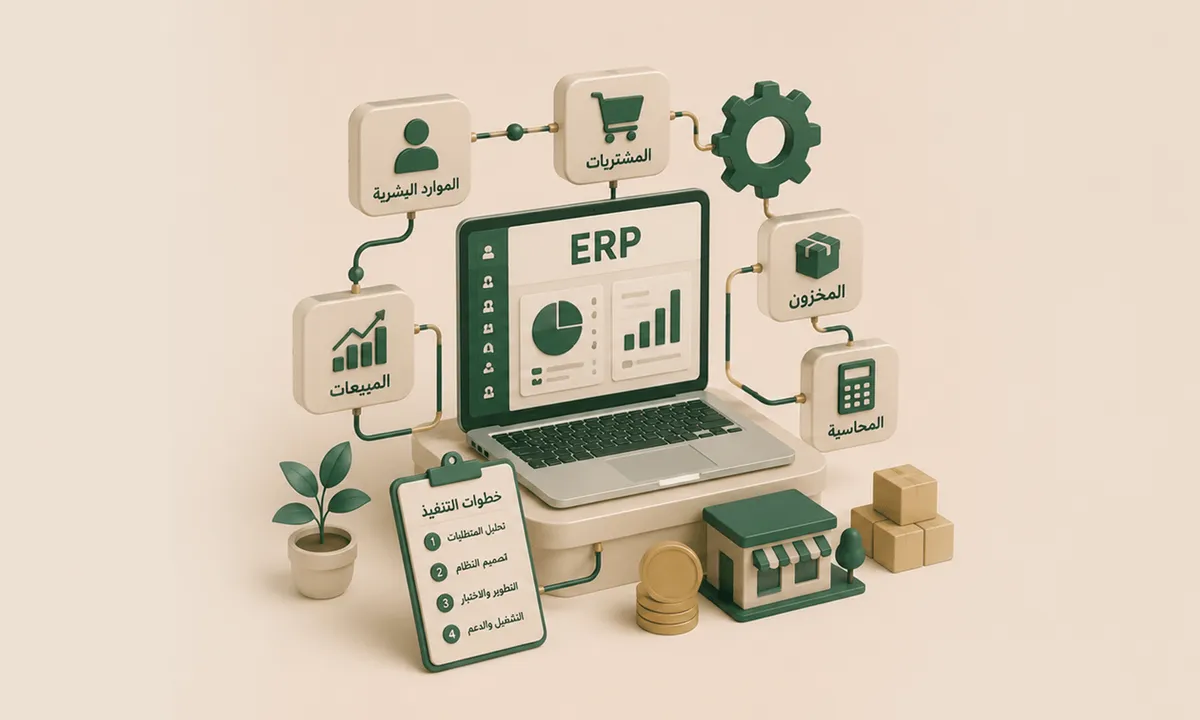
An ERP system consists of integrated modules; you choose the ones that suit your project and add to them as you grow:
💰
Accounting and Finance
Accounts, invoicing, and financial reports.
📦
Inventory Management
Tracking quantities, movement, and alerts.
🛒
Sales and Purchasing
Managing orders, suppliers, and customers.
👥
Human Resources
Employees, payroll, and attendance.
🏪
Points of Sale
Integrating branches and direct sales with the system.
📊
Reports and Analytics
Dashboards for data-driven decisions.
These modules are part of a broader business management system. Learn about our comprehensive services in sales, customer, and point-of-sale management systems (ERP – CRM – POS).
4. Steps to Build an ERP System for Your Project
Building a successful ERP system involves well-thought-out steps that ensure the system truly serves your business rather than becoming a burden:
Define your goals and requirements
What problems do you want to solve? And which modules do you actually need?
Analyze Your Current Processes
Understand your workflow and its weaknesses so you can implement a system that fits it.
Choose the right system
Off-the-shelf or custom, cloud-based or on-premises—depending on your size and business.
Start with the core modules
Implement the most important ones first (accounting, inventory), then expand.
Train your team, then launch
Train your team, migrate data, and test the system before going live.
5. Phased implementation is key
The biggest mistake in ERP implementation is trying to roll out everything at once, which overwhelms the team and increases risks. The smartest approach is phased implementation:
🪜
Start with what’s most important
Implement the most urgent module first and get it right.
📊
Measure the results
Make sure each phase is successful before moving on to the next.
➕
Expand gradually
Add new modules as the team gets used to them and the system stabilizes.
🔄
Continuously improve
Refine the system based on the team’s feedback and needs.
Why a phased approach? A phased rollout reduces risk, facilitates team adoption, and spreads out the cost. Instead of the shock of changing everything at once, your project moves smoothly from chaos to order, one step at a time.
6. Off-the-shelf or custom?
An important question when building an ERP. An off-the-shelf system is faster and cheaper initially but forces you to adapt your business processes to fit it, whereas a custom system is built precisely around your business and gives you full ownership and flexibility. For projects with unique operations or expansion plans, a custom system is a wiser long-term investment—a system that fits your business, not the other way around, and one you fully own without restrictive subscriptions or the limitations of off-the-shelf templates.
7. Common Mistakes in ERP Implementation
Many ERP projects falter due to avoidable mistakes. Be aware of them to ensure your system’s success:
- Lack of clear goals: Starting without defining what you want to solve leads to a system that doesn’t serve you.
- Rolling out the system all at once: Launching all modules at once overwhelms the team and increases the likelihood of failure.
- Neglecting team training: Even the best system will fail if the team doesn’t know how to use it properly.
- Focusing Only on Price: Neglecting the total cost (maintenance, training, updates).
- A system that doesn’t fit your business: Choosing a generic system that doesn’t account for the specifics of your business.
- Poor data transfer: Inaccurate data transfer undermines the system from the start.